


A valid SPF, DKIM, and DMARC result did not stop a Windows executable from riding inside an inline PNG. The control gap is content inspection, not authentication.
The uncomfortable part of the IRONSCALES case is not that malware hid in an image.
It is that the message took a clean road into the inbox.
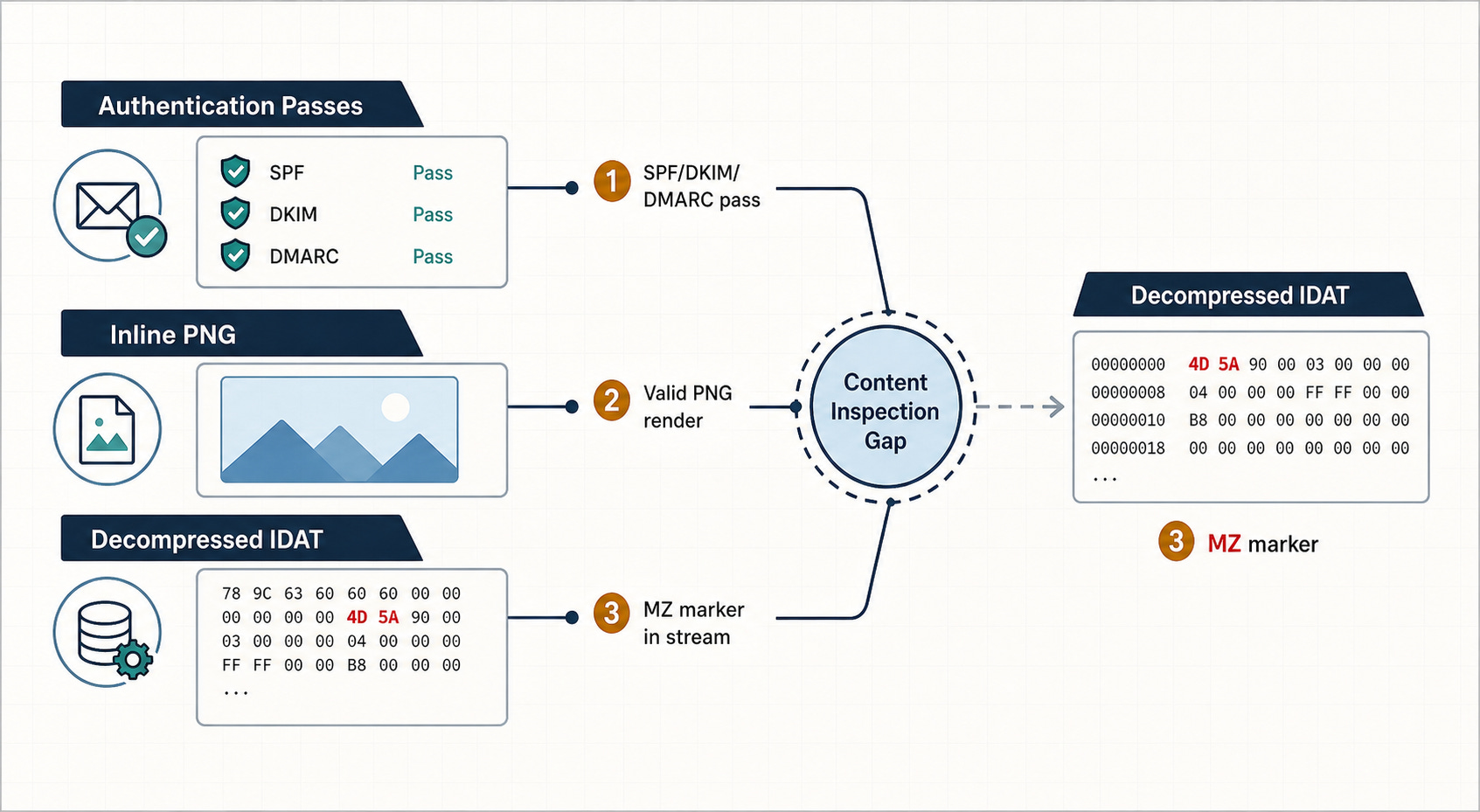
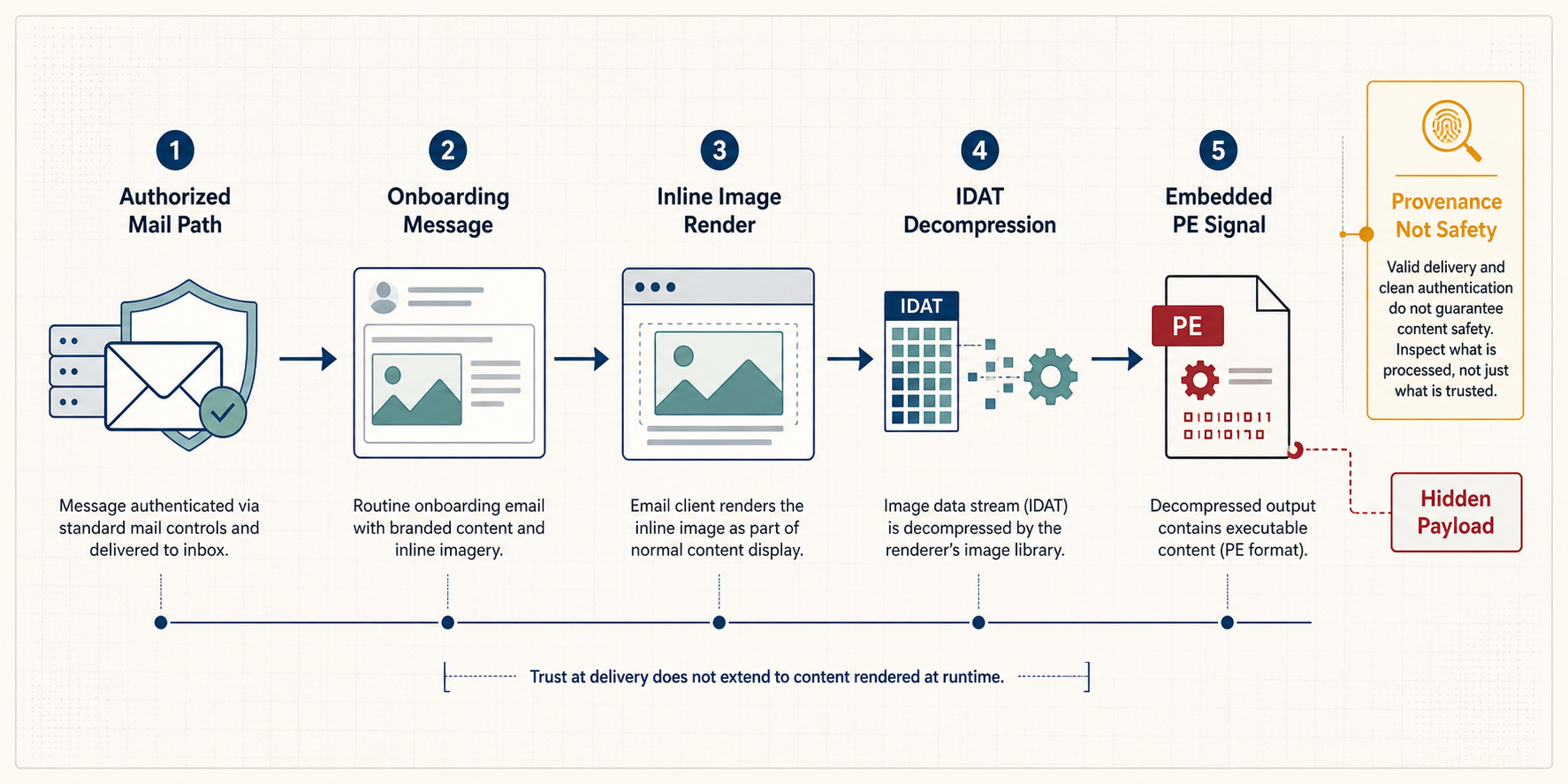
The onboarding email passed SPF, DKIM, and DMARC. It arrived through an authorized mail path. It rendered like routine account setup for a claims-management platform, complete with inline screenshots and training links. By the header-level signals many teams are taught to respect, the message looked legitimate.
Then one inline image carried a Windows executable inside its compressed PNG data.
Authentication proved the route. It did not prove the cargo.
For CTI analysts and email security teams, this is an initial access problem hiding in a familiar mailbox workflow. The message did not need spoofed headers to become dangerous; it needed a softer inspection lane after authentication had already done its job.
The Green Check Was Real
This is where precision matters.
SPF checks whether the sending IP is allowed to send for the envelope domain. DKIM verifies that signed headers and body content were not modified after signing. DMARC ties those results to the visible From domain and applies the sender's policy.
Those controls are necessary. They reduce spoofing. They help receivers reject mail that should not have arrived from that domain.
But they answer a provenance question: did this message travel an authorized path and remain intact?
They do not answer the content question: is everything inside this message safe?
IRONSCALES reported that the email passed SPF, DKIM, and DMARC under a reject policy, with a composite authentication score of 100. That means the sender path checked out. It does not mean the inline images were benign.
The difference sounds obvious in a diagram. In production, it is easy to over-read a green result.
The Payload Was Inside The Picture
The message carried three inline PNG images. Two were ordinary visual elements. The third, named `image007.png`, was the interesting one.
On the surface, it was a valid PNG. It parsed. It rendered. A format check saw an image.
The problem lived deeper.
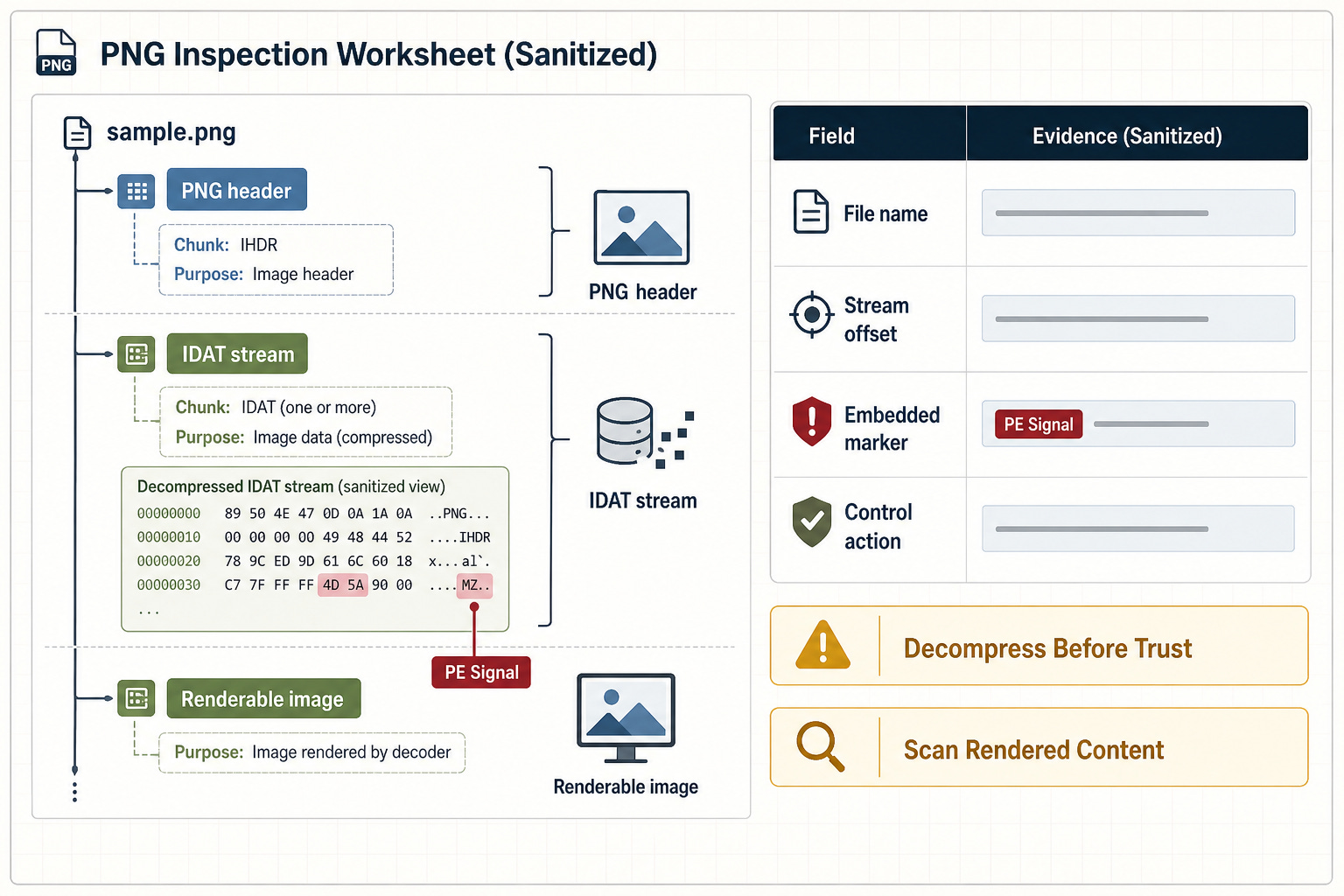
PNG image data is stored in one or more IDAT chunks, compressed with zlib. When those chunks were decompressed, IRONSCALES found a stream of roughly 6.5 MB. At offset 696,056 inside that decompressed stream sat the bytes `MZ`, the signature that begins a Windows portable executable.
That distinction is important. This was not the blunt trick of appending a binary after the end of a file. The executable marker was woven into data the image format legitimately carries.
A scanner that only checks the file header sees a PNG. A scanner that only cares whether the image renders sees a screenshot. The scanner that decompresses and inspects the image stream sees the payload signal.
Inline Images Sit In A Softer Lane
Email security controls often treat attachments and inline display assets differently.
An attachment is a file. It is expected to be opened, sandboxed, blocked, rewritten, or detonated. It lands in the obvious inspection lane.
An inline image is part of the message body. It is usually there to render branding, screenshots, buttons, signatures, or instructional content. That makes it feel like presentation layer, not payload layer.
The IRONSCALES case sits exactly in that gap. The file was a display asset, but the data stream carried executable structure. The message did not need to fail authentication. The image did not need to stop rendering. The malicious signal only appeared after deeper content handling.
IRONSCALES maps the technique to MITRE ATT&CK T1566.001 for spearphishing attachment and T1027 for obfuscated or embedded payloads. That mapping is useful because the operational point is not novelty. It is that embedded payload inspection has to follow the content, not the label.
The Indicators Are Narrow
The useful publishable indicators in this case are intentionally limited.
IRONSCALES named the file as `image007.png` and reported hashes for the weaponized image, including MD5 `4370319336a256e38dedae0c95414090` and SHA-256 `70fb798321c7b92e65a78a172a4429f3009216efef1c86118efd747dcceb638d`.
It also reported the embedded PE signal at decompressed IDAT offset 696,056.
There is a reason this is not a domain-blocking story. The message authenticated through an authorized path tied to a real domain. Treating the route itself as the enemy would be the wrong control move.
The durable signal is the content artifact: the inline PNG, its hashes, and the embedded executable marker after decompression.
The Human Clues Still Matter
The body also carried mixed-brand signals. IRONSCALES described a message where one financial-services brand appeared in header graphics, another vendor name appeared in contact details, and a different entity appeared in the sign-off.
Any one of those can happen in legitimate co-branded workflows. Stacked together, they should lower confidence.
That is the correct role for content and behavioral context. It should not replace authentication, and it should not pretend every oddity is malicious. It should raise the message into a deeper inspection path when the route is clean but the content has friction.
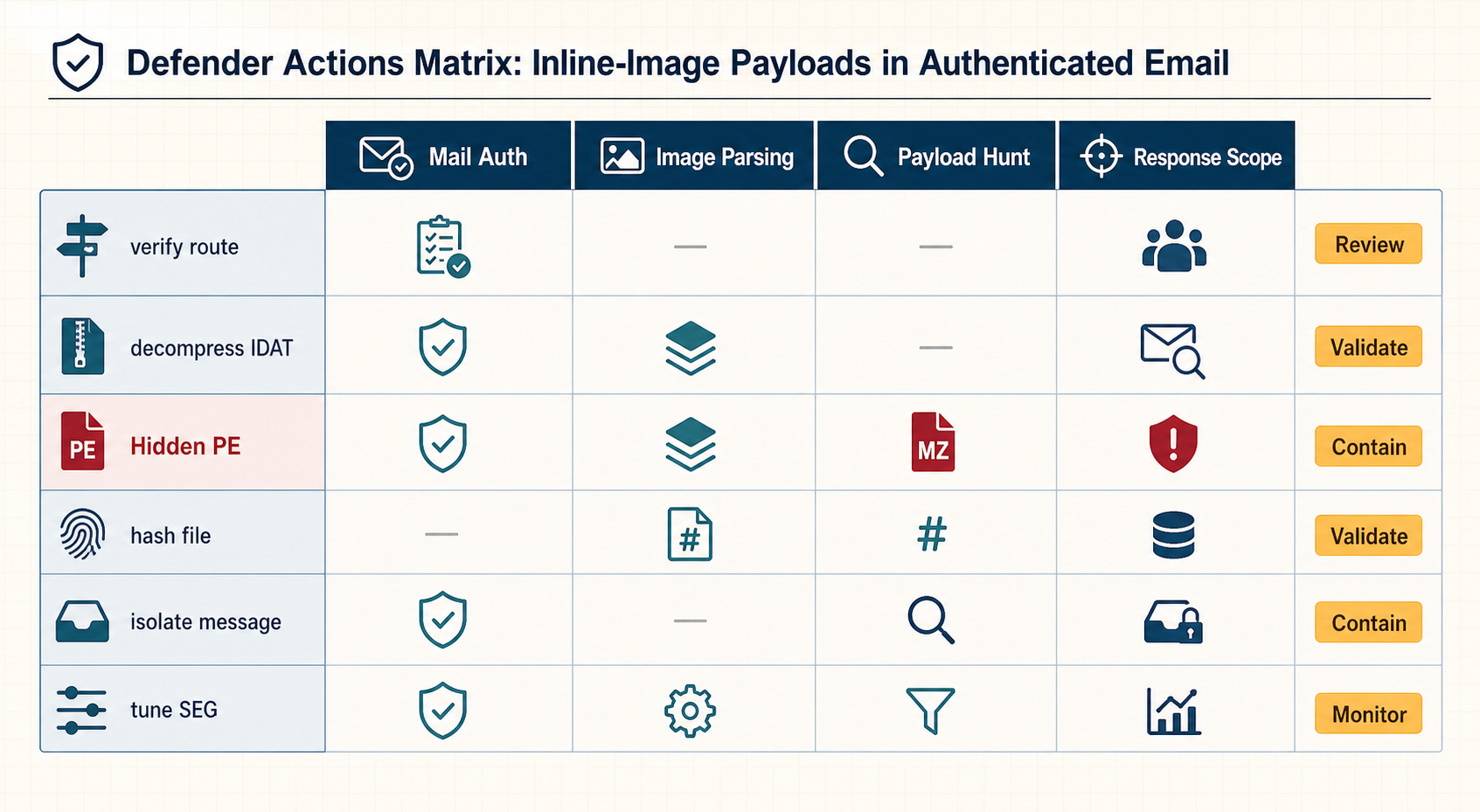
This is the defensive shape: authentication, content parsing, behavioral context, and response scope all working together.
One green check cannot carry the whole decision.
The Control Move Is Decompression
For defenders, the highest-value lesson is practical.
Inspect the message body as content, not just as a rendered email. Inline images should be eligible for the same kind of deep parsing teams already expect for attachments, especially when the message has unusual branding, first-time-sender context, or onboarding/payment/account language.
For PNGs, that means decompressing IDAT streams and scanning the resulting bytes for embedded file signatures such as `MZ` and PE structure. It also means preserving the file for hashing, hunting for matching artifacts, and tuning secure email gateway behavior so display assets do not become a blind spot.
There is no need to turn this into a panic rule.
Do not block a legitimate sender domain just because one authenticated message carried bad content. Do not assume every inline image is malicious. Do not treat DMARC as a malware verdict.
Do the narrower, better thing: validate the route, then inspect what the route delivered.
What To Hunt
Teams that want a focused review can start with four checks:
Inline PNGs in suspicious onboarding, payment, account, or claims-management messages.
PNG files whose decompressed image data is unusually large relative to the rendered content.
`MZ` or PE markers inside decompressed image streams, not only appended after the file end.
Matching file hashes for the reported `image007.png` artifact where telemetry allows safe hash search.
The point is not to distrust authentication.
The point is to put authentication back in its lane. SPF, DKIM, and DMARC are still worth enforcing. They tell you whether the message arrived through the expected road.
They never told you what was riding in the trunk.