


The dangerous part of a fake installer is not always that the expected software fails. Sometimes it works.
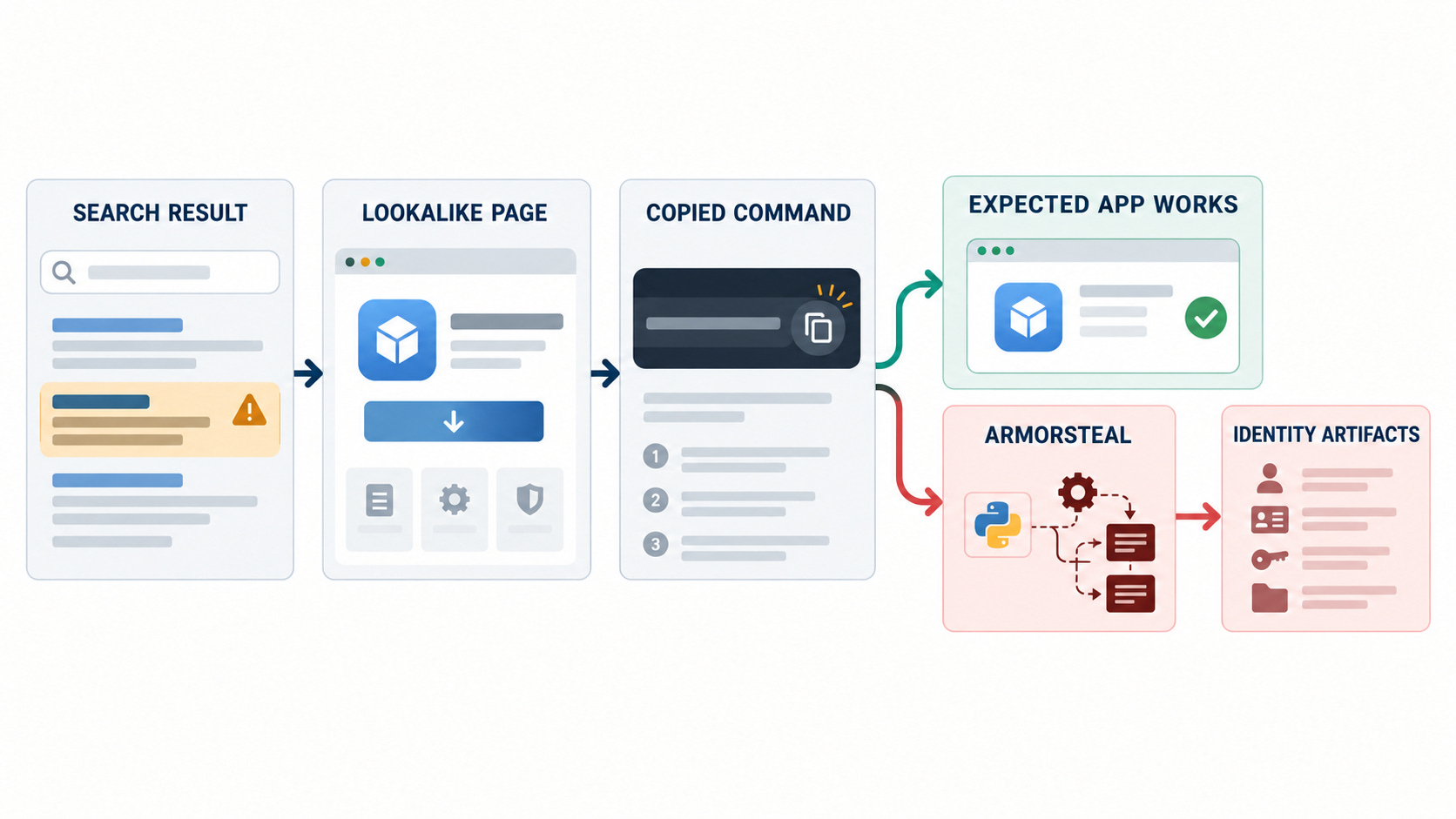
In research published October 22, Zscaler ThreatLabz described a September campaign that pushed a Python-based stealer through sites impersonating Chocolatey and Microsoft Activation Scripts. A visitor found an install command through search, pasted it into PowerShell and received Armorsteal. On the fake Chocolatey path, the script also ran the legitimate installer.
The package manager appeared to install correctly. The copied command set in motion a chain that installed components for remote access, surveillance and credential collection.
Zscaler’s report is detailed enough to establish the delivery chain, malware components, persistence artifacts, collection targets and changing infrastructure. It does not publish a victim count, prove that every targeted artifact was successfully stolen, document any later account takeover or identify the operator. Those boundaries matter as much as the malware details.
Success was part of the delivery
The campaign used two lookalike sites aimed at people searching for Windows installation instructions. One impersonated Chocolatey with a misspelled domain. The other impersonated the Massgrave project. Both presented a PowerShell command for the visitor to run.
This was not a drive-by compromise. The user supplied execution, and the command asked for elevated privileges. The installer then hid the PowerShell window, placed a Python runtime and protected scripts under a Windows-looking directory, and created scheduled tasks for persistence.
On the Chocolatey path, the legitimate installer ran too. That detail is operationally important: a person who receives the tool they wanted has less reason to question the source or open a support ticket.
An application launching successfully proves function. It does not prove origin.
The control failure therefore began before endpoint execution. Search ranking became an informal software catalog; a lookalike page became the documentation; a copied command became the installer; and success became the user’s confirmation signal.
One command created three lines of control
Zscaler separated Armorsteal into three main components.
The remote-access module profiled the host, contacted command infrastructure and fetched tasks. It verified those tasks with an embedded RSA public key before running them, tracked task versions and could update itself. The operator had built a managed control channel, not a one-shot script.
The surveillance module recorded active window titles and keystrokes, watched the clipboard and could take screenshots when selected terms appeared. The stealer module targeted browser cookies and saved passwords, password-manager data, Discord tokens, cryptocurrency material, SSH keys and Steam session data.
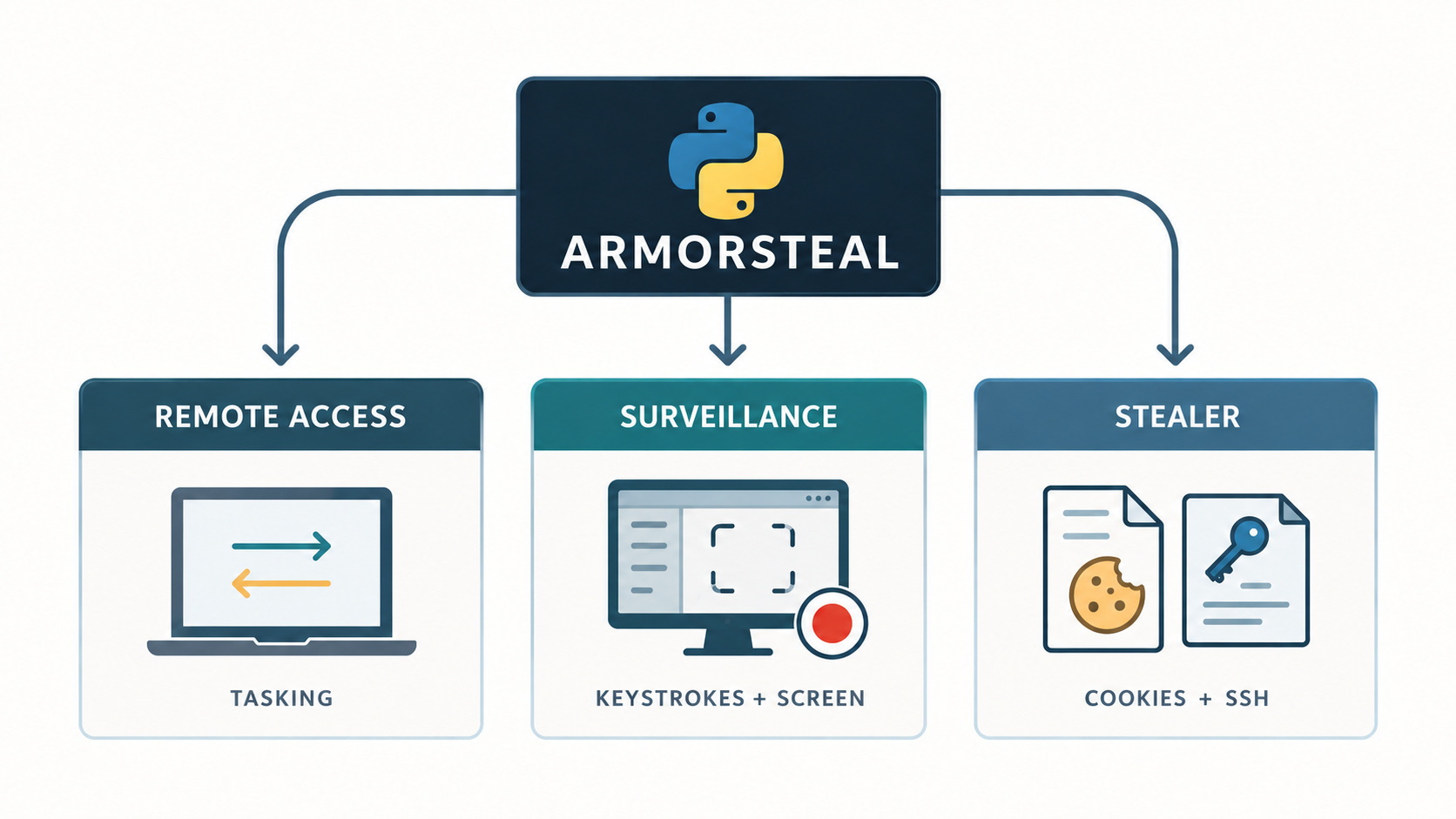
That combination expands the response problem. A browser cookie and an SSH private key are both targeted artifacts, but they do not create the same access path, live for the same length of time or require the same invalidation step. A generic instruction to “reset the password” cannot close every route this collector was designed to open.
Collection capability is not proof of downstream access
The public evidence supports a clear chain through delivery, execution and targeted collection. It stops before proven downstream access.
Confirmed by the published analysis: the lure sites delivered the installer; the installer established persistence; the examined components could collect named artifact classes; and the malware had upload paths for stolen data.
Not established by the report: how many people executed the command, whether a particular cookie or key was current, whether an operator replayed it, whether an identity was verified, whether an organization was breached, or who controlled the campaign.
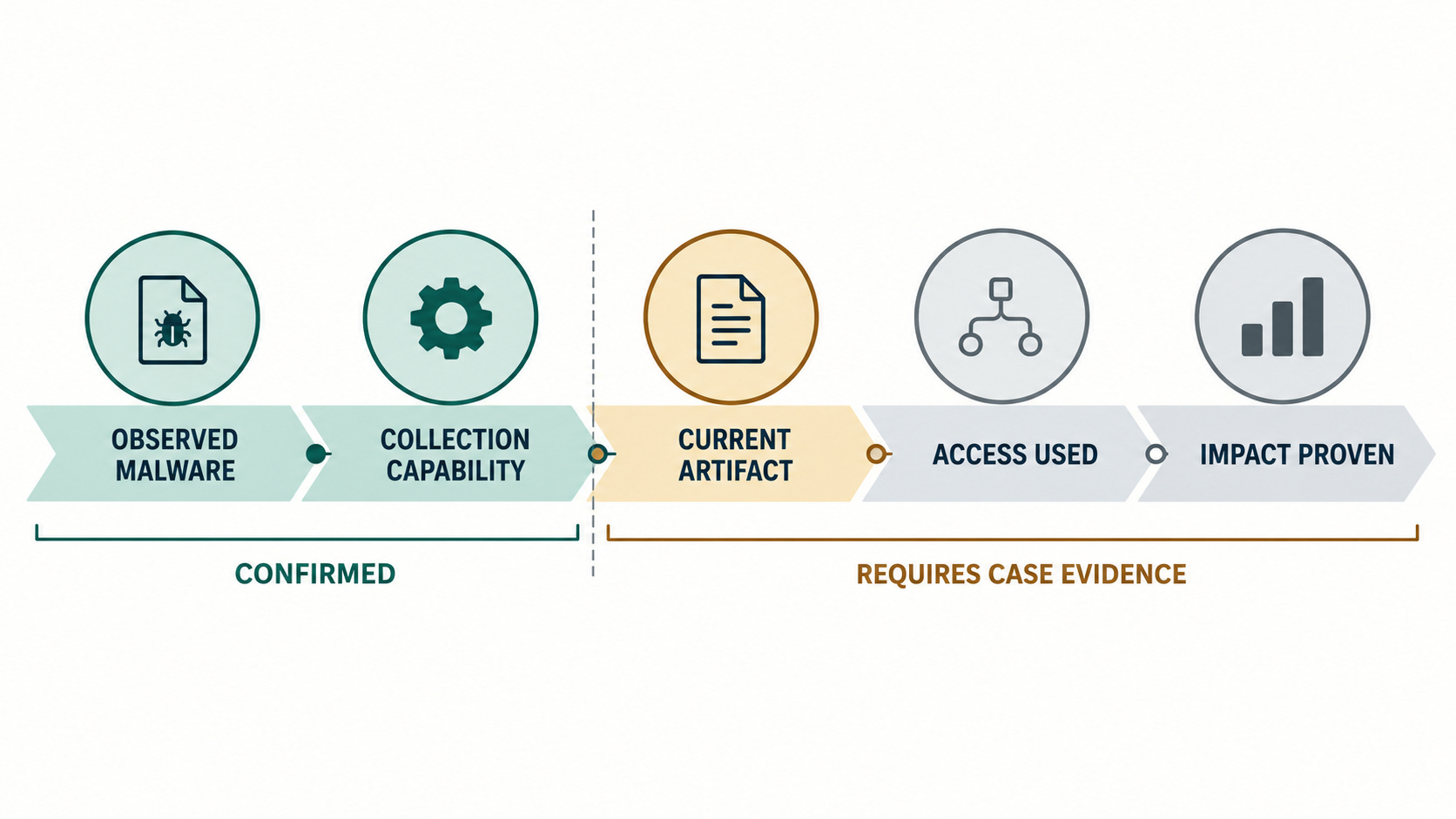
That distinction prevents both understatement and exaggeration. An infected device is sufficient reason to contain and investigate. It is not sufficient evidence to announce a cloud breach. A stealer capable of taking SSH keys creates a credible server-access risk. It does not prove that a server login occurred.
My first question would not be, “Which malware family is this?” It would be: which artifact classes existed on this host, and what could each one reach?
That produces a better investigation map: host evidence on one side; browser, identity, developer, communications and financial artifacts in the middle; authentication and transaction records on the other. The job is to test each possible bridge, not assume that all of them were crossed.
The infrastructure moved while the evidence stayed useful
Zscaler linked the two lure paths through shared malware components, infrastructure and the same task-signing key. During the observation period, the operator moved hosting, changed command domains and later required tokens and a custom header for module downloads.
The shifting infrastructure makes a domain-only response fragile. Blocking known addresses is still useful, but it is a snapshot. The durable evidence sits closer to the host: the suspicious scheduled tasks, the Windows-looking installation directory, unexpected bundled Python, PowerShell download activity, browser processes started for remote debugging and the sequence of outbound requests described in the report.
This is where artifact hierarchy matters. Infrastructure indicators can expire quickly. Persistence names and file paths can be changed. Behavioral relationships—search-led command execution, elevated scripting, a new runtime, scheduled persistence, browser collection and staged exfiltration—survive longer as an investigative model.
Containment starts with the host, then follows the artifacts
A bounded response should move in two directions at once: preserve what happened on the endpoint and invalidate what may have left it.
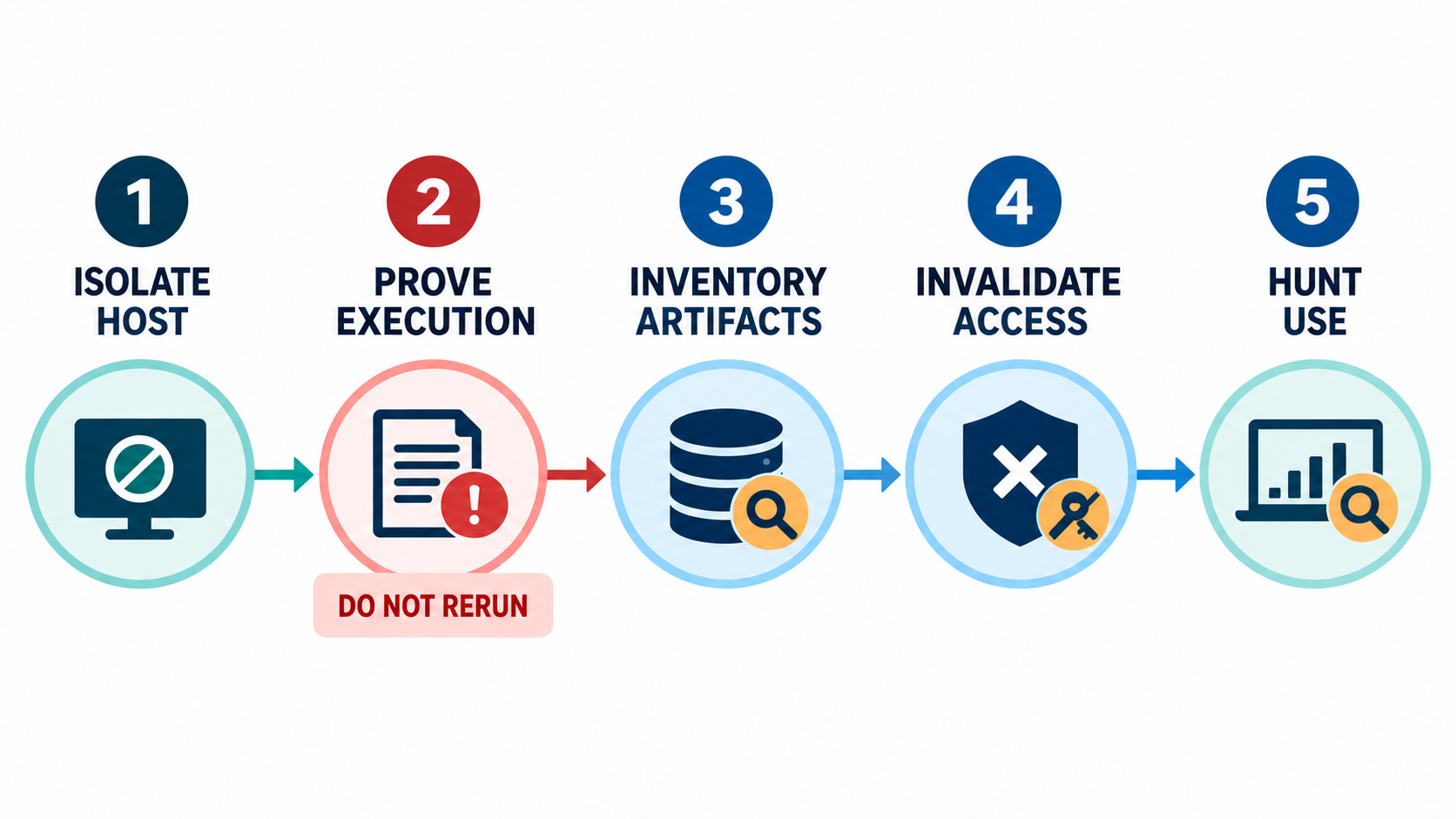
First, isolate the suspected host and preserve PowerShell, process, scheduled-task, browser and network evidence. Verify the execution path without rerunning the command. Zscaler identifies two scheduled tasks and a Windows-looking directory that can anchor triage; its report carries the exact indicators for teams that need them.
Second, inventory the artifact classes that were present and reachable on that host at the time. Do not treat the malware’s target list as proof that every item existed or was exfiltrated. Use it to define the scope of the check.
Third, invalidate by artifact. Revoke browser and application sessions where exposure is plausible. Rotate affected passwords, SSH keys and service credentials from a clean system. Review password-manager and developer-tool access according to the products actually present. Handle wallet exposure through established incident procedures rather than improvised recovery.
Finally, hunt for use. Correlate identity, server, source-control, messaging and transaction records with the infection window. Look for successful access, new persistence and actions that do not fit the user’s normal device, geography or workflow. Absence of one indicator should narrow the assessment, not erase the infection.
Search cannot be a software approval system
Awareness advice usually ends with “check the URL.” That is too weak for a workflow in which staff are expected to paste privileged commands from public pages.
Organizations should decide which software sources are approved before a user searches for them. Internal installation documentation, managed package repositories, application control and logging for elevated scripting turn software acquisition into a governed process. Search can help someone find information; it should not decide which command earns administrative execution.
Armorsteal is a useful warning because the lure did not need to break the expected installation. It delivered the expected result and the compromise together.
When success is easy to counterfeit, provenance has to be checked before execution—not inferred afterward.