


The contact arrived in Microsoft Teams wearing the name of an IT service desk. The fix was supposedly a “PowerShell Cleaner” installer hosted on Microsoft Azure. Once it ran, the credential phish no longer needed a browser.
It could draw its own Windows lock screen on the infected endpoint.
Expel researchers found the previously undocumented malware, which they named SynkLoader, while investigating a scheduled-task alert on August 18. They reverse-engineered its command-and-control protocol, made a decoy look like a large Active Directory environment, and watched the operator respond with additional modules and hands-on-keyboard profiling commands.
The fake prompt was only one piece. SynkLoader paired local password-capture capability with a backconnect proxy and interactive control from the same infected machine.
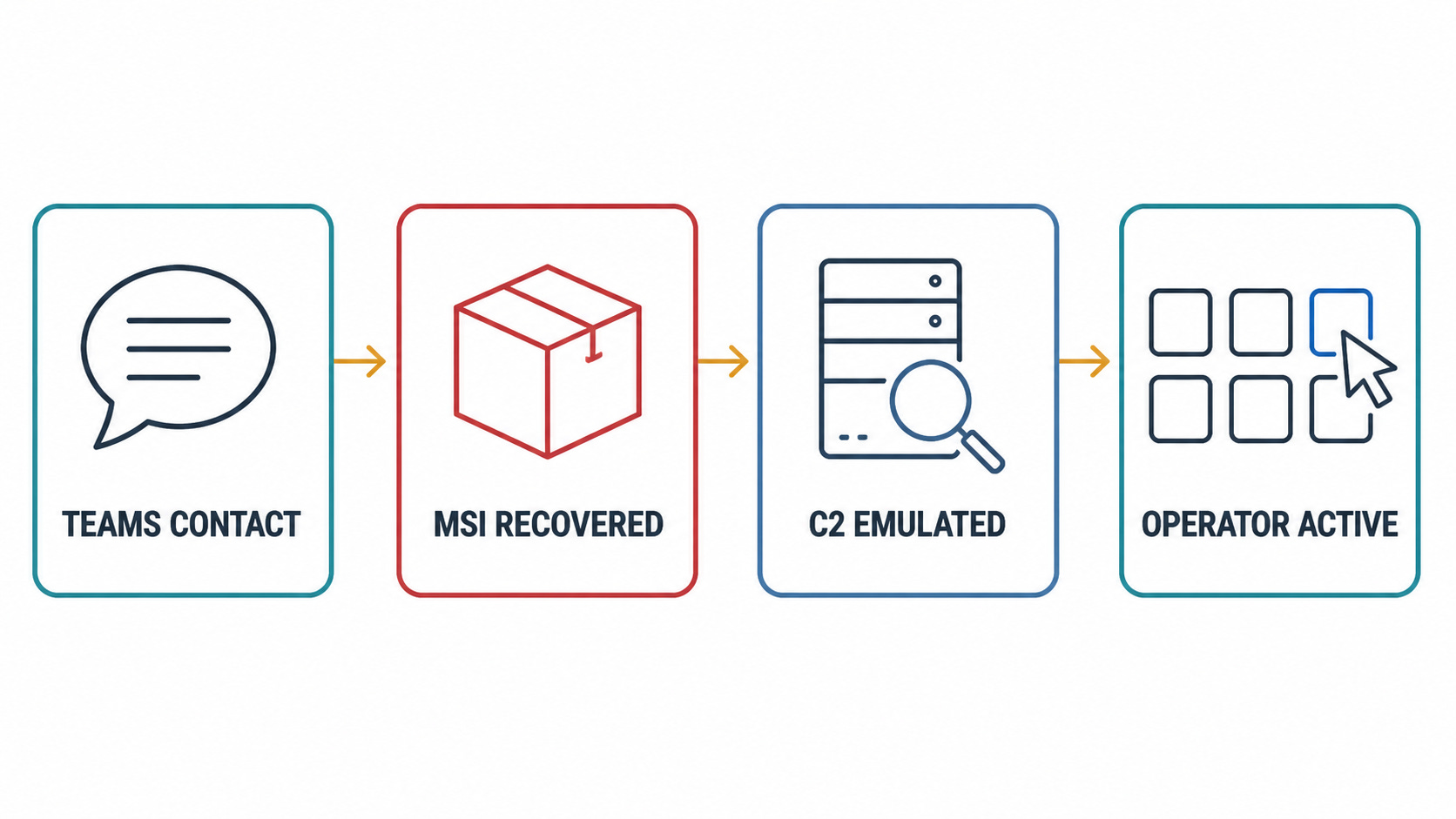
This is not a capability inferred from a product demo. The chain was reconstructed from an investigated endpoint, reverse engineering, a C2 emulator, and observed operator interaction.
The collaboration layer delivered the installer
Expel could not recover the full Teams conversation, so the exact wording of the lure remains unknown. The surviving metadata showed an account using an onmicrosoft.com address and the display name “IT Service Desk.” The target was persuaded to install an MSI package from an Azure Blob Storage endpoint. The installer presented itself as PowerShell Cleaner.
That boundary matters. The research does not describe exploitation of a Teams software flaw. It describes abuse of an external collaboration path, a trusted support identity, and Microsoft-hosted storage to make an unsolicited installer feel routine.
Microsoft’s separate investigation of cross-tenant help-desk impersonation reached the same defensive point: these intrusions depend on a user accepting external contact and approving follow-on actions, not on an attacker breaking Teams itself.
Organizations do not need to end external collaboration to reduce that risk. They do need an explicit policy for who may contact employees, a visible way to distinguish internal support from external accounts, and a support process that users can verify through a second channel.
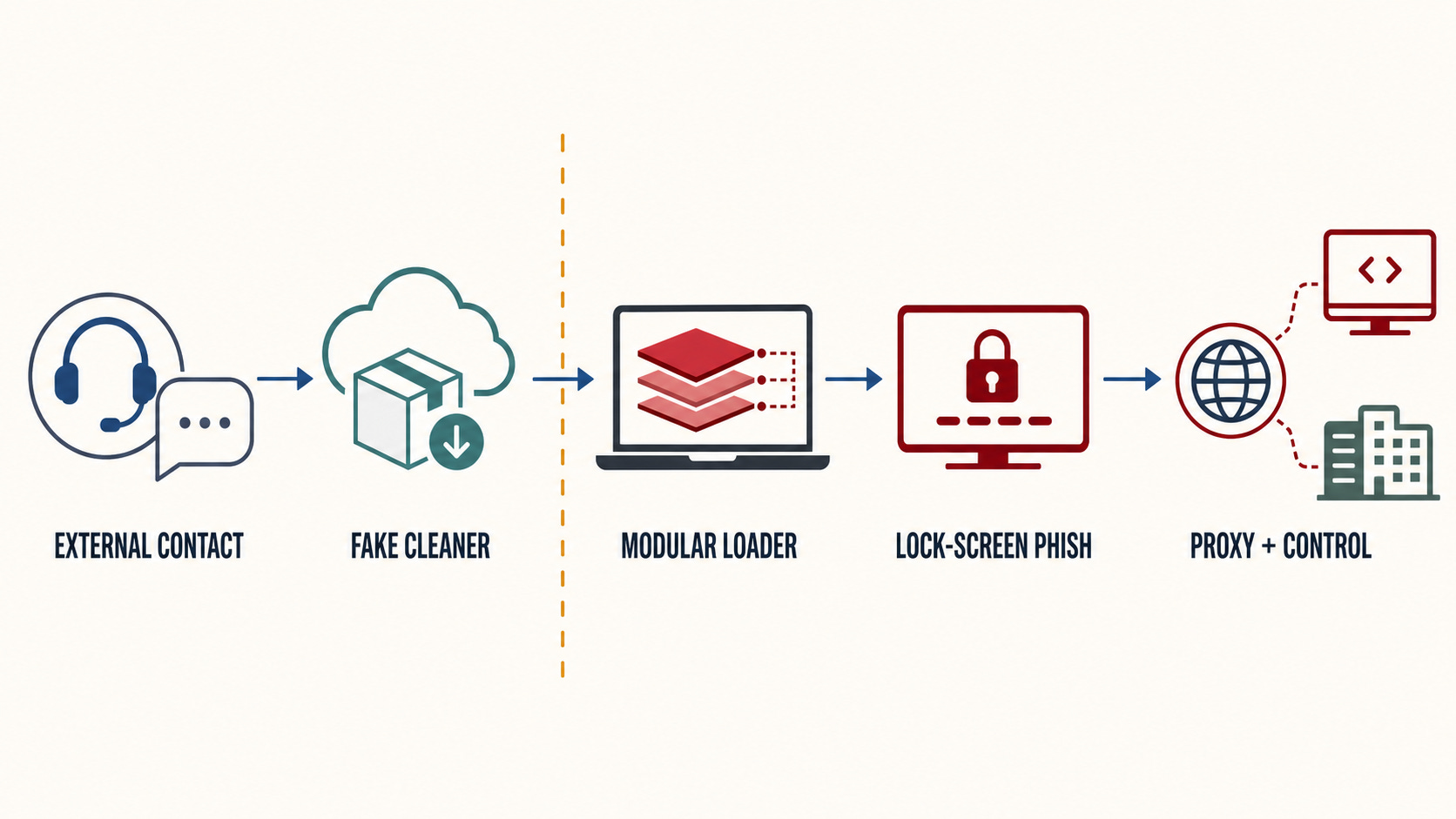
The initial contact, installer, credential prompt, and remote-access capabilities form one chain. Treating any stage as an isolated alert loses the useful context.
The loader profiled the prize before choosing the tools
The first-stage package extracted a PowerShell script, an archive, a self-contained Python runtime, an obfuscated Python loader, and DLLs that impersonated Microsoft runtime components. The resulting chain moved between Python, PowerShell, C-sharp, and C++ while keeping much of the later execution in memory.
The profiler collected the hostname, logged-on user, privilege level, processes, services, domain, and the number of computers visible through Active Directory. Expel altered its decoy response to claim membership in a domain with thousands of systems. The operator then delivered persistence and the lock-screen module. After more than 12 hours, the decoy received a reverse proxy, an interactive shell, VNC-style desktop control, and a module-status script.
The selection behavior is more useful than the language count. It shows a loader that can measure an environment, wait for operator judgment, and receive only the capabilities needed for the next step.
Expel could not determine the final objective or attribute the operator. Its assessment that the toolkit may belong to a ransomware group or an initial-access broker is explicitly low-to-medium confidence. That boundary should remain intact: Active Directory sizing and interactive access are consistent with ransomware preparation, but they do not prove a ransomware deployment.
A fake lock screen can create a real identity incident
The PhishLocker component retrieved the current username and Windows lock-screen image, then rendered a full-screen borderless application resembling Windows 11. It did not validate the password locally; entering any value would dismiss it. The purpose was capture, not authentication.
There were visible seams. Alt+Tab could expose other windows above the fake screen, and the prompt lacked some normal visual behavior. Ctrl+Alt+Delete also provides a trusted operating-system path that an ordinary application cannot reproduce.
Those checks are useful for a person facing an unexpected prompt. They are not a containment plan after execution.
The companion TrafficRedirector module could connect outward to the operator and relay traffic to internal or internet services through the infected machine. That creates a dangerous combination if the prompt succeeds: a raw password obtained locally and a network path originating from an already trusted endpoint. Expel describes the capability; it does not report that every available module was successfully used against the original organization.
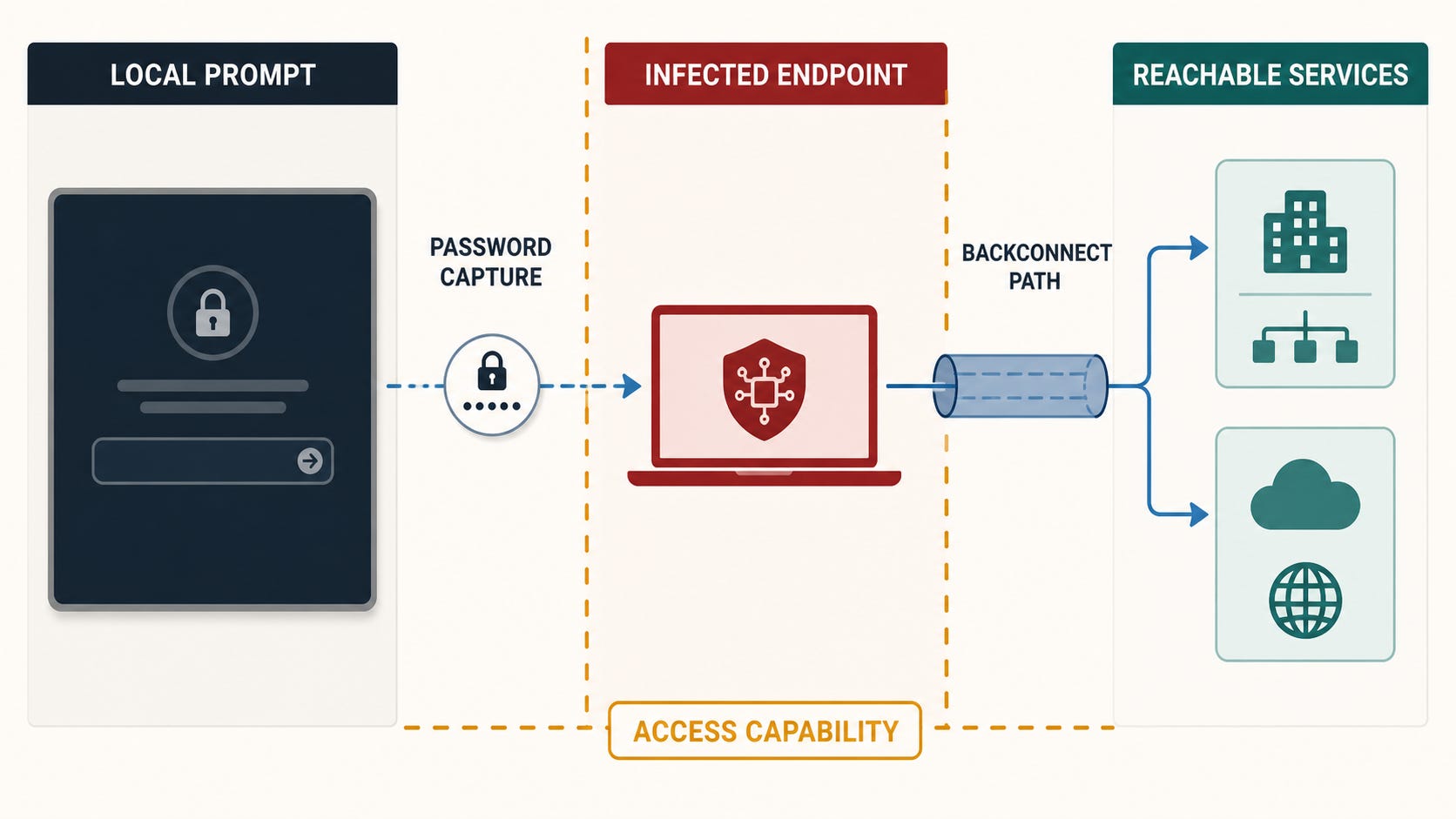
The password-capture capability and the network origin belong in the same investigation. Familiar source IPs do not make subsequent authentication benign.
One hash will not carry this detection
Expel published hashes for the recovered installer and first-stage files, plus domains associated with the observed infrastructure. It also warned that several later modules embed victim-specific identifiers, making their hashes unique to each infection.
That makes sequence-based evidence more durable than a single blocklist entry. Hunt for the combination:
an unexpected external help-desk contact in Teams followed by an MSI download;
a package presenting itself as a cleaner and staging PowerShell plus a private Python runtime;
a randomly named scheduled task launching Python from a user profile at logon and again daily;
in-memory PowerShell activity crossing Python and custom DLLs; and
outbound connections followed by proxy, shell, or remote-desktop behavior.
The sequence also gives responders a clean scoping question: Which identities, endpoints, and network sessions intersected the lure, the installer, and the later control channel?
Close the path, not just the prompt
Start by isolating systems that executed the installer and preserving the MSI, archive, scheduled-task definition, process tree, and relevant network telemetry. Then invalidate active sessions and rotate credentials from a clean administrative device. A password change performed on a still-controlled host can simply expose the replacement.
Review Teams audit and reporting data for the external sender, related domains, and other recipients. Microsoft documents both granular external-access policies and user reporting for suspicious Teams messages and external users. Apply those controls according to the organization’s collaboration needs; a blanket allow-all posture should be a decision, not an inherited default nobody reviewed.
Finally, correlate identity events with endpoint and proxy evidence. Successful authentication from a familiar device or address is not sufficient closure when the device itself may be carrying the operator’s traffic.
A credential prompt does not become trustworthy because it appears outside the browser. SynkLoader moved the phish onto the endpoint—and positioned that endpoint as the path back in.
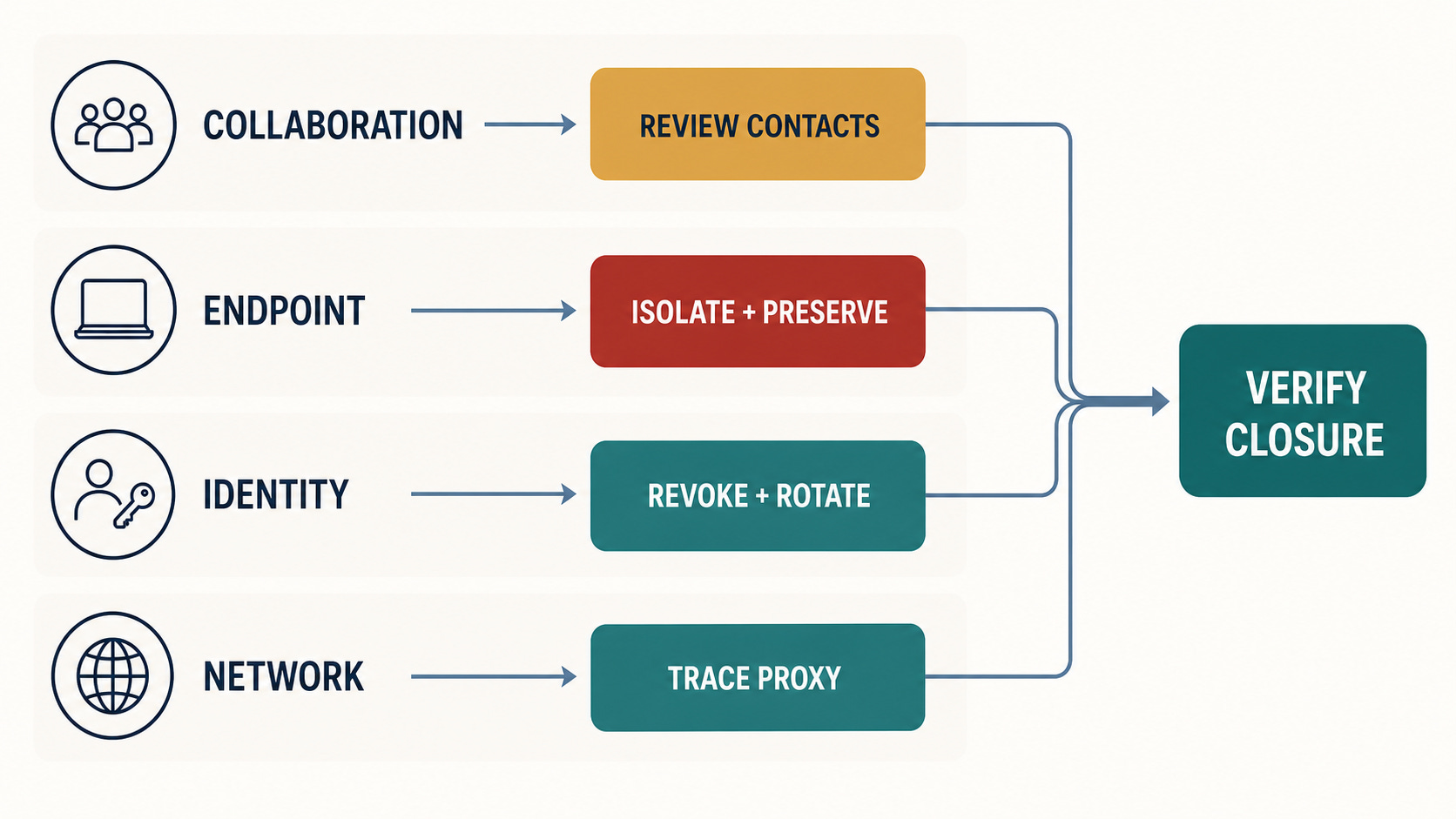
Closure requires evidence across the collaboration, endpoint, identity, and network layers. Removing the fake prompt addresses only one visible symptom.